Exclude Smart in Functional Coverage
Shailesh Vasekar
Director, Neurotech Circuits Private Limited
Abstract
Verification coverage is a critical metric in hardware verification, ensuring that a design is thoroughly tested. This paper explores techniques to optimize verification code and functional coverage using the Cadence IMC tool. The focus is on increasing the coverage percentage while efficiently excluding unnecessary or irrelevant statements that do not contribute to meaningful verification. Both code coverage and functional exclusion options are discussed, with specific emphasis on excluding certain metrics such as expression and toggle coverage in code coverage and assertion and covergroup coverage in functional coverage when appropriate. Additionally, this paper provides insights into configuring attribute selectors within the IMC tool, which offers various options like assertion grade, covergroup grade, assertion passed, assertion failed, and more. These techniques aim to enhance verification efficiency while maintaining the integrity of coverage analysis.
1. Introduction
Functional coverage is an essential in contemporary hardware design to guarantee that a design is extensively verified prior to deployment. Reliability, functional correctness, and adherence to industry standards all depend on achieving great coverage. But not all coverage indicators are equally important for meaningful verification, and adding extraneous coverage data might result in ineffective verification procedures, drawn-out simulations, and inaccurate conclusions. The Cadence IMC tool, a popular coverage analysis tool in the semiconductor industry, is utilised in this work to investigate verification coverage optimisation. The study focuses on methods for eliminating superfluous or redundant coverage measures to maximise verification efficiency. We examine both functional and code coverage, finding instances in which specific metrics such as assertion and covergroup coverage in functional coverage and expression and toggle coverage in code coverage may be omitted without compromising the thoroughness of the verification.
In addition, the report talks about how Cadence IMC's attribute selectors help verification engineers improve coverage analysis. Assertion grade, covergroup grade, assertion passed, assertion failed, and more parameters that aid in refining the coverage model are examples of these selectors. Verification teams can retain high-quality coverage analysis, minimise simulation overhead, and expedite the verification process by utilising these strategies.
2. Uploading the Merge File
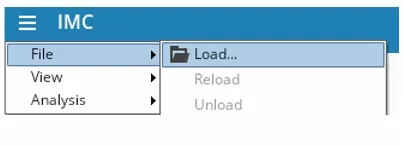
After successfully passing regression, a merge file is created. In the above figure, the File option provides a Load File feature, Load Run Directory window will pop-up and load the merge file.
After loading the file, a hierarchical matrix will be displayed. Clicking on a small symbol, such as a triangle ▶, will expand or collapse the hierarchy, as shown in Figure 2.1.
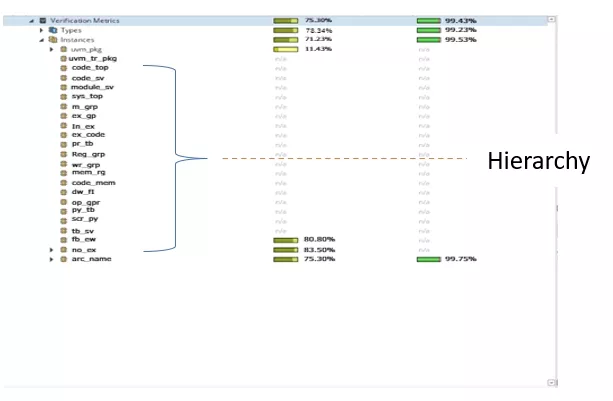
Fig. 2.1: Hierarchical matrix
3. Code Coverage and Exclusion
In code coverage, this paper includes only expression and toggle coverage. If we double-click on the selected coverage, it will open the particular coverage with the expression.
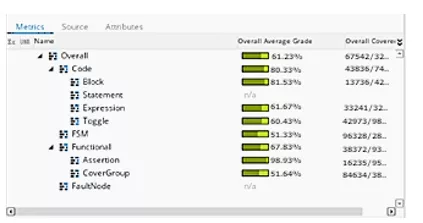
Fig. 3.1: Code coverage view
3.1 Expression Coverage
For convenience, options like Overall Average Grade sort expressions based on their percentage.
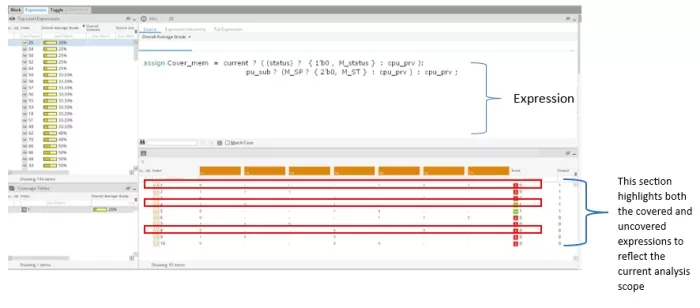
Fig. 3.1.1: Expression coverage details
For example, in the image one expression Cover_mem is shown. Expression Coverage is a sort of code coverage that assesses whether all potential Boolean expressions in the design have been assessed during simulation. By making sure that every logical condition in an expression has been tested with every potential result, it assists in identifying missing test cases. The condition is represented in the form of T1 – T7, as shown in the image. When the cursor hovers over an T expression, it displays the corresponding condition name in the table.
Consider in index:
- Expression 1: T1 must be '0', and T5, T6, and T7 must be '1'. However, in this case, one of the expressions did not cover the value '1', or T1 is not '0', resulting in incomplete coverage and the score is '0'. Despite this, the output remains '1' because at least one or two expressions satisfied the required condition.
- Expression 4: T1 and T4 must be '1', while T2 must be '0'. Since these values are covered by this expression, the score is '1'. However, the '–' symbol represents 'Empty', meaning it does not consider any value from the expression.
- Expression 8: T1, T4, and T6 must be '0'. However, if an expression is not required to cover a value or is hardcoded as '1' or '0', meaning it never changes for other conditions, it can be excluded. To do this, right-click on the expression, select the Exclude option, and then right-click on that expression to provide a reason using the Comment option.
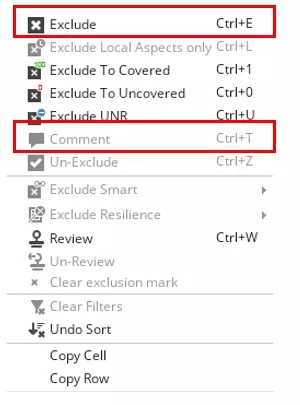
Fig. 3.1.2: Exclusion popup
Let’s consider another type of example:
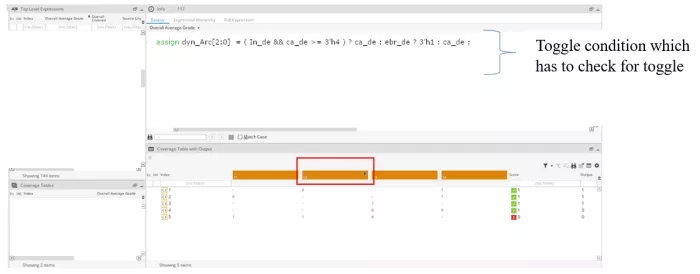
Fig. 3.1.3: Condition list
In this example, a condition such as ca_de has an additional condition within dyn_Arc. When hovering the cursor over T2, it displays the name of the associated condition. By double-clicking the downward arrow ⬇ it reveals whether the condition's values are covered or not, as shown in Fig. 3.1.4.
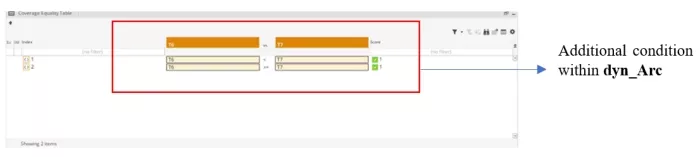
Fig. 3.1.4: Detailed condition view
ca_de has a condition >= 3'h4, which means in the code, values less than 4 are also being covered, along with the actual condition itself. In the image, this results in a score of '1'. However, in some cases values less than 4 are not recommended and should ideally be excluded. In this example, even though values less than 4 are not recommended, they are still being counted as covered; the exclusion is based on recommendation, not enforcement.
3.2 Toggle Coverage
Toggle coverage is a kind of code coverage that determines if a signal's bits have toggled or altered during simulation. During simulation, it indicates if every bit in a wire or register has changed from 0 to 1 and from 1 to 0.
In the verification metrics, there is a toggle option that displays the toggle coverage details, including any properties that should be excluded.
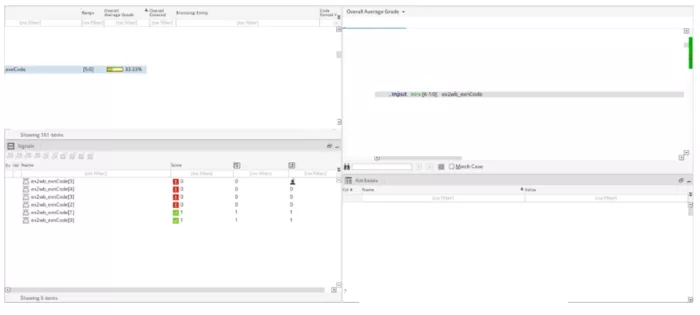
Fig. 3.2.1: Toggle coverage overview
In toggle coverage, consider the 4th expression in Fig. 3.2.1:
always_ff @(posedge clk or posedge rst) begin
    if (rst) begin
        ex2wb_exnCode <= 0;
    end
    else begin
        ex2wb_exnCode <= ex2wb_exnCode + 1;
    end
end
In the example above, the signal ex2wb_exnCode toggles on the positive edge of clk or rst, which results in a toggle coverage score of '1'.
If ex2wb_exnCode is assigned a constant value like assign ex2wb_exnCode = 1'b1;, it will never toggle during simulation. In such cases, the signal can be excluded from toggle coverage. However, exclusions should be done carefully and only when justified. This is referred to as Exclusion Smart. Exclusion can also be applied without using Exclude Smart, in which case it only affects a specific instance rather than the entire hierarchy.
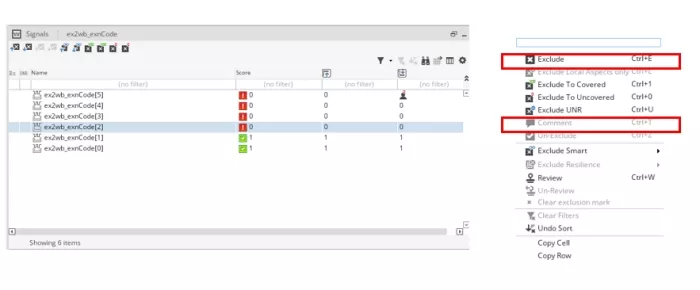
Fig. 3.2.2: Exclude Smart menu
Smart Exclusion removes the expression from the entire hierarchy, ensuring it is not considered in any coverage analysis. After applying the exclusion, it's recommended to add a comment explaining the reason and save the exclusion using the Save option in the menu.
In the expression view, you can see options for exclusion, such as excluding coverage on the rising or falling edge of the clock—useful when certain transitions are not relevant for coverage, as shown in Figure 3.2.3.

Fig. 3.2.3: Rising/Falling edge options
4. Functional Coverage and Exclusion
One kind of coverage statistic in System Verilog that quantifies the extent to which the planned behaviour of the design has been evaluated is called functional coverage. In functional coverage, we include Assertions and Covergroups.
4.1. Assertion Coverage
Assertions are written in System Verilog to formally specify and check the expected behaviour of a design. We can determine whether and how many times assertions have been triggered during simulation by looking at assertion coverage. The assertion condition is true at least once; if the assertion fails, it means bad behaviour has been detected.
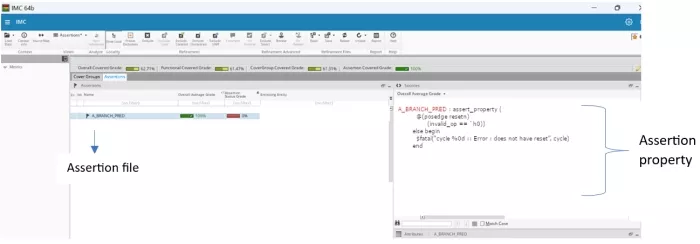
Fig. 4.1.1: Assertion view
In the example above, the A_BRANCH_PRED assertion checks that the invalid_op signal is equal to '0' on the positive edge of resetn. If this condition is not met, a fatal error is triggered. The sensitivity list @(...) can be modified based on design requirements. If this assertion is not required for a particular scenario, or if the condition is not realistically achievable, it can be excluded from coverage, as shown in the image. After applying the exclusion, it's recommended to add a comment explaining the reason for exclusion for better traceability.
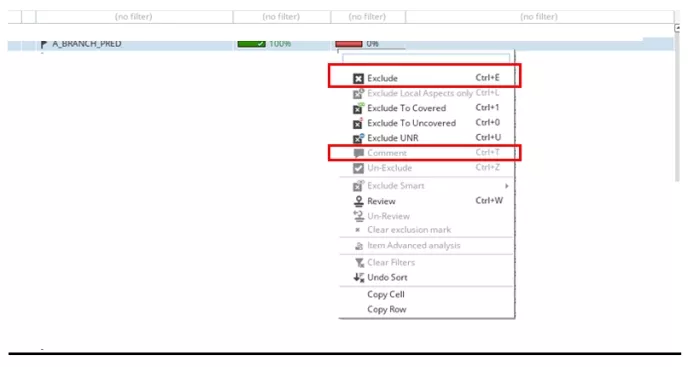
Fig. 4.1.2: Exclusion comments
4.2. Covergroup Coverage
In the given example, A_BR is the file which contains the covergroup property. During simulation, a covergroup can be used to monitor and assess if significant values or conditions have occurred. You may ensure that your testbench is testing everything it should by using functional coverage. cpwbExXcpofExcXxpExc is a covergroup that crosses with multiple conditions.
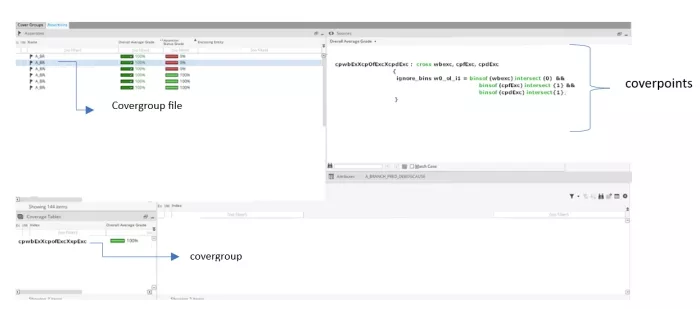
Fig. 4.2.1: Covergroup table
If a covergroup is not necessary for coverage, right-click on the selected covergroup, choose 'Exclude', add a comment explaining the reason, and save the change in the .refine file.
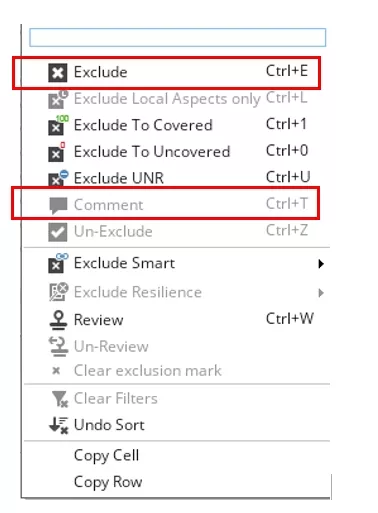
Fig. 4.2.2: Covergroup exclusions
Saving the Exclusions in .refine File
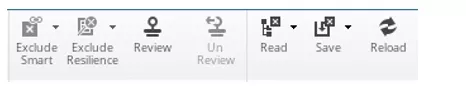
To save the process, we need to store it in a .refine file. The Save option is available in the menu option. Click on the save icon ▼ to store the changes. If you click on save, the file will be saved in the default location. We can choose to save after all exclusions are done or save after each exclusion, as it will overwrite the existing .refine file, as shown in the figure below.
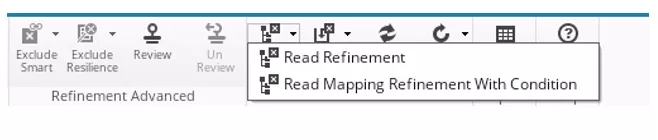
If the IMC tool is closed and exclusions are saved in the .refine file, we can resume from where we left off. To do this, use the Read option in the top menu bar to load the .refine file, allowing us to continue with the same exclusions by clicking on the Read Refinement option as shown in the figure below.
To unload the read .refine file and start with a fresh IMC window without any exclusions or previously loaded data, use the Unload option in the menu. The first option unloads all refinement files, and the second option unloads a single specified file. This will remove the currently loaded file and reset the session as shown below.

How to Add Multiple Attributes
The Attribute Selector provides various options for adding grade criteria. It displays pass and fail coverage grades in a convenient format, making it easier to view metrics such as code and functional coverage.
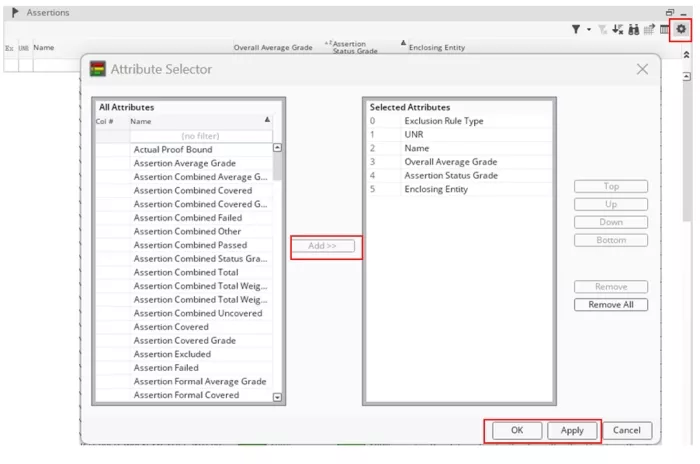
In the image, the settings option is located at the top-right corner. It opens the Attribute Selector, allowing you to customize the display by adding options such as assertion grade (pass/fail) and covergroup grade (pass/fail). After selecting the desired attributes, add them to the 'Selected Attributes' list, then click 'Apply' and 'OK'. The selected attributes will then be displayed on the screen.
Summary and Conclusion
This paper has presented a systematic and detailed methodology for optimizing verification coverage metrics using the Cadence Integrated Metrics Center (IMC) tool, focusing on the strategic exclusion of irrelevant coverage points to enhance efficiency and integrity.
The core of the methodology centres on refining both code and functional coverage to better reflect meaningful design verification:
- For code coverage, specific procedures were outlined for handling expression and toggle coverage, including the critical distinction between standard Exclude (instance-specific) and Exclude Smart (hierarchy-wide) to permanently remove signals, such as hardcoded wires, from the entire coverage analysis.
- In functional coverage, the method allows for the exclusion of unnecessary assertion and covergroup metrics, thereby ensuring that the coverage model focuses solely on required functional goals.
A crucial component of this optimization is the persistent management of exclusions via the .refine file, which enables saving, loading, and unloading of refinement decisions to maintain consistency and allow for seamless resumption of work. Furthermore, the paper detailed the use of the Attribute Selector to customize the metric view, aiding engineers in quickly visualizing key data points like assertion pass/fail grades.
By applying these targeted exclusion and metric management strategies, verification teams can significantly reduce noise in coverage reports, minimize simulation overhead, and ultimately achieve a faster and more representative verification closure, maintaining the high-quality standards essential in contemporary hardware design.